Ranking Flows#
Use a ranking flow to compare the items in each batch and collect a score for every item. create_ranking_flow() returns a RapidataRankingFlow.
For the shared lifecycle and flow management methods, see the flow overview.
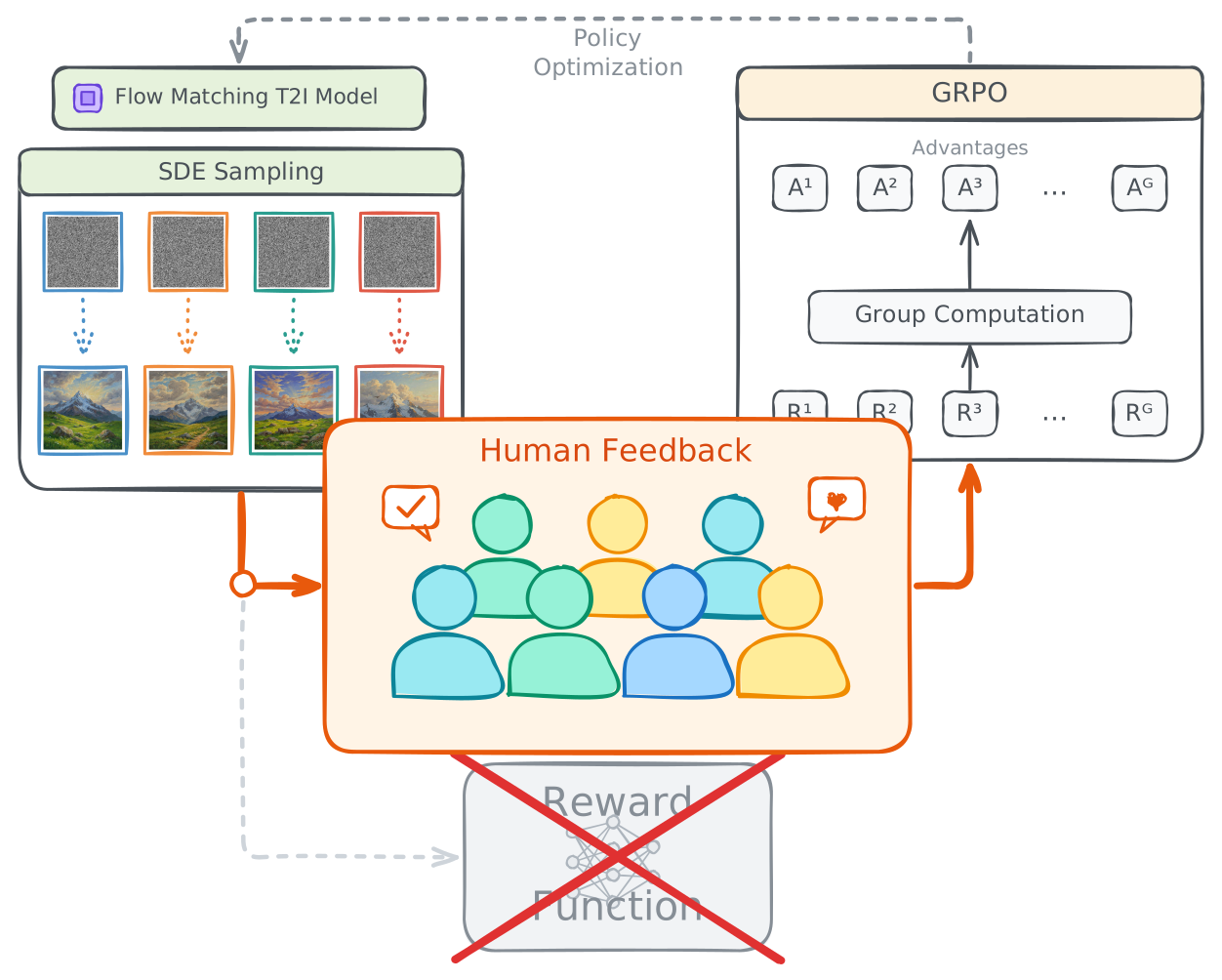
Human Rewards for GRPO#
A ranking batch returns one score per item, which is the group reward that GRPO needs. Submit the G samples generated for a prompt as one batch, and use the scores in place of a learned reward model.
1. Create a Flow#
Start by creating a ranking flow with an instruction that will be shown to evaluators for each comparison:
from rapidata import RapidataClient

client = RapidataClient()

flow = client.flow.create_ranking_flow(
    name="Image Quality Ranking",
    instruction="Which image looks better?",
)
You can optionally configure a response threshold range to control how many pairwise comparison responses are collected per flow item:
max_response_threshold(default100): The target number of responses. The system will try to collect up to this many responses for each flow item.min_response_threshold(default =max_response_threshold): The minimum number of responses you are willing to accept. If thetime_to_liveexpires and fewer thanmin_response_thresholdresponses have been collected, the flow item is marked as Incomplete. If at leastmin_response_thresholdresponses have been collected, it is marked as Completed.
flow = client.flow.create_ranking_flow(
    name="Image Quality Ranking",
    instruction="Which image looks better?",
    max_response_threshold=200, # (1)!
    min_response_threshold=50, # (2)!
)
- The target number of responses. The system will try to collect up to this many responses for each flow item.
- The minimum acceptable response count. If
time_to_liveexpires with fewer than this, the flow item is marked as Incomplete; otherwise it's Completed.
2. Add a Flow Batch#
Submit datapoints to the flow by creating a batch. Each batch uploads a set of items that will be compared and ranked:
flow_item = flow.create_new_flow_batch(
    datapoints=[
        "https://example.com/image_a.jpg",
        "https://example.com/image_b.jpg",
        "https://example.com/image_c.jpg",
    ],
)
Ranking batches accept one shared context: str and context_assets: list[str] (1–10 image, video, or audio paths/URLs). You can also set time_to_live:
flow_item = flow.create_new_flow_batch(
    datapoints=[
        "https://example.com/image_a.jpg",
        "https://example.com/image_b.jpg",
        "https://example.com/image_c.jpg",
    ],
    context="A red fox sitting in a snowy forest at sunrise", # (1)!
    time_to_live=300, # (2)!
)
- Shown alongside the instruction for each comparison — here, the prompt the images were generated from.
- Stops the flow item after this many seconds and returns the responses collected so far. Up to 1 hour, and at least 60 seconds with the default flow settings; defaults to 4 minutes when omitted.
3. Get Results#
Call get_results() on a flow item to retrieve the ranking results. If the flow item is still processing, this will automatically wait until it completes (or becomes incomplete due to time_to_live):
This returns a FlowItemResult. For the batch above it looks like this:
FlowItemResult(
    datapoints={
        "https://example.com/image_a.jpg": 1243,
        "https://example.com/image_b.jpg": 1102,
        "https://example.com/image_c.jpg": 987,
    },
    total_votes=150,
)
It has two fields:
datapoints: a mapping of each item to its score. The score is a Bradley–Terry strength estimate fitted over all pairwise comparisons, then mapped onto an Elo-style scale (default starting score 1200) so the values read like familiar Elo ratings. Items are keyed by their source URL when provided, otherwise by their original filename. A higher score means the item was preferred more often across comparisons.total_votes: the total number of pairwise comparisons collected across all items.
Access the fields directly:
ranking = results.datapoints  # {"https://example.com/image_a.jpg": 1243, ...}
votes = results.total_votes   # 150

# Items sorted from best to worst
ranked = sorted(results.datapoints.items(), key=lambda item: item[1], reverse=True)
You can also check the status without blocking:
status = flow_item.get_status() # Pending, Running, Completed, Failed, Stopping, Stopped, or Incomplete
Note
A ranking flow item enters the Incomplete state when its time_to_live expires with fewer than min_response_threshold responses. You can still retrieve partial results from incomplete flow items.
To get the win/loss matrix per flow item and see what datapoints were preferred over each other:
This returns a pandas DataFrame where matrix.loc[a, b] is the number of times item a was preferred over item b.
To get the total number of pairwise comparison responses collected for a flow item:
4. Update Flow Configuration#
You can update the configuration of a ranking flow at any time:
Note
This config will only affect new flow items and not modify existing ones.